

A POS system can keep recording sales in Tanzania when the internet drops, then sync records automatically once the connection returns. POS software pricing in Tanzania depends on the setup, including branches, users and devices, as well as any separate hardware. Offline selling matters because a weak connection should not stop counter sales.
Look beyond the subscription when comparing systems. Setup, product loading, extra users and devices, and optional services can affect the total cost. Mobile money support and offline use also determine how well a system fits daily work.
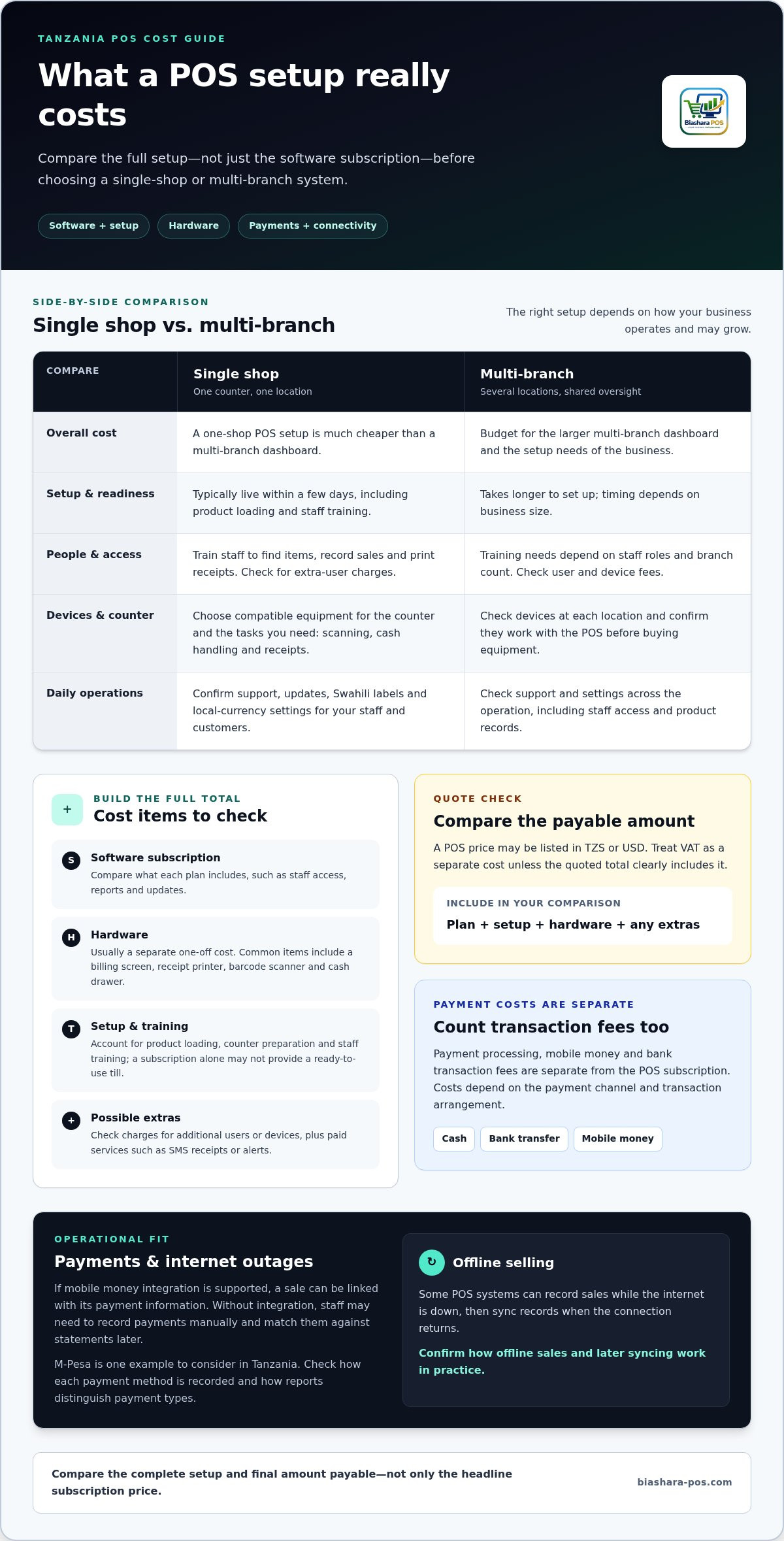
This guide explains the main POS cost components in Tanzania, how plan features can differ, and what to consider for mobile money and offline sales. It also compares the practical needs of a single shop and a multi-branch operation, helping you assess which setup fits your business.
Key Takeaways
- Separate software costs from one-off hardware, setup, product loading, and possible extra-user or device fees.
- Compare a single-shop setup with a multi-branch system based on the way your business operates and may grow.
- Prioritize mobile money integration and confirm how sales records and inventory behave during internet outages.
- Review what each plan includes, including staff access, reports, updates, and any charges for SMS receipts or alerts.
- BiasharaPOS is free for up to 1,000 sales per month, with business modules including Restaurant, Clothing, and Retail.
How much does a POS system cost in Tanzania?
The total cost depends on the software plan, shop setup and equipment. Separate subscription charges from setup, training and hardware before comparing options.
A POS price may be listed in TZS or USD. Treat VAT as a separate cost unless the quoted total clearly includes it. Compare the final amount payable, not just the headline price.
Setup, Training, and Local Support
Setup can include preparing the software, loading products and getting the sales counter ready for staff. A subscription alone does not necessarily provide a ready-to-use till.
A single-shop setup is typically live within a few days, including product loading and staff training. A multi-branch setup takes longer, depending on business size. Staff should practise searching for items, recording sales, and handling receipt printing before serving customers.
Ask how updates are handled and whether they’re included in the plan. For Tanzania operations, local customer support can help resolve practical issues, such as staff access or product records, without interrupting counter work. Training needs also depend on staff roles and the number of branches.
Device and Peripheral Compatibility
A POS system may run on a tablet, computer or mobile phone, while peripherals support checkout tasks. Check device compatibility before choosing equipment, since incompatible hardware can disrupt receipt printing and stock workflows.
Common hardware includes a billing screen, receipt printer, barcode scanner and cash drawer. A small counter may need a different setup from a busy shop that scans products and prints receipts throughout the day. Hardware is usually a separate one-off cost, not part of the software subscription.
List the devices already used at the counter before comparing plans. Then identify what you need for scanning, cash handling and receipts. A mobile POS setup can suit businesses with limited counter space or sales away from a fixed till.
Internet reliability also affects the setup. Some POS systems record sales offline and sync them when the connection returns. This can preserve sales records during an outage, but check how offline selling and later syncing work in practice.
Local settings also deserve attention. Check whether the interface supports Swahili and whether prices, reports and receipts can use the currency your business works with. Clear labels for staff can reduce confusion during a busy shift.
Compare the complete setup, not just the plan name. Include software, separate hardware, product loading, staff training, extra users or devices, and paid services such as SMS receipts or alerts. These details can explain why two systems for one shop have different total costs.
Before deciding, compare the cost of a one-shop POS system with a multi-branch dashboard: in Tanzania, a POS system for one shop is much cheaper than a multi-branch dashboard. Setting up a POS system can be expensive for small businesses in Tanzania, so include setup in the overall budget. Staff need training to use a POS system effectively. Also check whether a provider offers local customer support in Tanzania, and whether the system supports Swahili or local currency settings.
Does it work with mobile money networks?
A POS can connect sales records with mobile money when the software supports integration. M-Pesa is one example to consider in Tanzania. Integration can link a recorded sale to its payment, reducing manual reconciliation and helping reports show how customers paid.
Payment processing, mobile money and bank transaction fees are separate from POS subscription charges. Costs depend on the payment channel and transaction arrangement, so include them when assessing total operating costs.
How mobile money integration fits the sale
In a connected workflow, the cashier records a purchase in the POS and the customer pays through a supported mobile money service. The system can associate payment information with the sale, making it easier to compare sales and transaction records.
Automatic reconciliation requires a suitable integration. Without one, staff may need to record payments manually and match them against mobile money statements later. This adds work and can make it harder to spot a missing transaction promptly.
Keep the payment process clear at the counter. Staff need to know which payment method to select, where to record a transaction reference and how to handle a payment that appears incomplete. This matters in retail, restaurants and mobile sales, where a queue or delivery handoff can leave little time for later corrections.
Cash, bank transfers, and mobile payments
Cash, bank transfer, and mobile money each need a clear recording method. A cashier can mark a cash sale as paid, record a bank transfer against its sale, or capture the mobile payment details through an integrated workflow where available.
Consistent payment labels help owners compare totals across shifts. Reports that separate cash sales from M-Pesa payments, for example, make reconciliation more useful than a single combined sales figure. A business can also review payment patterns alongside purchase history or customer loyalty activity when those functions are part of its POS setup.
POS types, mobile apps, and APIs
Retail POS systems focus on shop transactions and stock. Restaurant systems support service at tables or counters. Mobile POS runs on a phone or another mobile device, which can suit sales away from a fixed till.
A mobile app is the interface staff use on a device. An API is a technical connection that lets separate software systems exchange information. Availability depends on the POS system and its integrations. These capabilities are not interchangeable: an app alone does not provide mobile money integration or API access.
For a practical comparison of retail and restaurant POS workflows, focus on how each payment method appears in the sale record and reports. That view helps connect checkout steps with the reconciliation work that follows.
Free plan and paid-plan upgrades
A free POS plan can help a small operation start recording sales without a subscription. Its value depends on the included tools and any limits that affect daily work. Compare how it handles inventory, payment records and profit reporting before relying on it at the counter.
What a free POS plan can cover
Free POS software may suit a shop testing digital sales tracking or a new counter with simple needs. Check whether it records each sale, adjusts stock and provides useful reports. If a system records payments but not stock movement, staff may have to update inventory separately.
Consider the full selling routine. A phone-based setup may help mobile sellers, while a fixed counter may need receipt printing and several staff logins. Free access is useful only if the included tools match how the business works. List daily tasks first, then compare them with the plan’s limits.
When an upgrade makes sense
Paid plans may add capacity or features as operations expand. Choose an upgrade to meet a specific business need, rather than assuming a paid tier is automatically better. A shop adding staff, for example, may need separate user access, while growing inventory may call for stronger stock tracking.
Compare the current workflow with the upgrade features. Look at users and devices, branch management, sales reports and extra services. If the free plan already records sales and stock accurately, an upgrade may not solve a current problem. If staff maintain parallel spreadsheets, broader reporting or inventory tools may reduce duplicate work.
Use a trial or demo to test the workflow
A trial lets staff work through real tasks before adopting a system. A demo shows how screens and functions operate, but may not test your own product list or payment routine. Use a sample sale to review item lookup, discounts, payment recording, receipt printing and stock changes.
Test an ordinary transaction and an exception, such as a returned item or corrected sale. Check that reports reflect the change and staff can find the record later. For mobile selling, practise the same workflow on the device used away from the counter.
Understand the price for your setup
The price of a POS setup depends on the required features, users, devices, branches and services. The quote should reflect the specific setup your business needs.
Before comparing free access with an upgrade, list the tasks the system must handle now and the changes you expect next. This keeps the decision focused on sales, inventory, profit visibility and payments, rather than plan labels alone.
Monthly POS subscription prices in Tanzania
Monthly POS subscriptions vary by included features, users, devices and branch needs. Compare recurring software charges with separate hardware and setup costs before judging affordability.
Monthly Subscription Plans
A monthly subscription is a recurring charge for access to POS software. The plan’s limits and included tools shape the ongoing cost.
POS subscription prices in Tanzania vary by system, from entry-level packages to plans with greater capacity. The total depends on business needs, such as inventory tracking, reports, staff access and support for additional branches. A single counter and a multi-branch operation need different setups.
Keep recurring software charges separate from one-off equipment costs. A receipt printer, cash drawer or barcode scanner may be outside the subscription. Extra users, devices, SMS receipts or alerts can also affect the bill. Compare each item by its billing period and whether it is optional or needed for daily operations.
Starter Plan Features
A starter plan is designed for a simpler point-of-sale workflow. A lower entry tier can be a practical fit when its limits match the shop’s needs.
Check which core tasks the plan covers: recording sales, updating inventory, producing reports and managing staff access. For a small retailer, product lookup and stock changes may matter most. At a food counter, quick order entry and clear sales totals may be more important.
Do not assume every starter plan includes the same tools. Compare transaction limits, supported devices, receipt options, user access and offline selling. Hardware is a separate consideration. A plan without a needed function can add manual work, even if its subscription seems cheaper.
Featured POS Software Prices
POS software prices are comparable only when the same costs and functions are included. A headline subscription may exclude equipment or add-on services.
Compare systems by cost structure, not brand name. Review monthly subscription charges, setup, extra users or devices, data migration, SMS charges and hardware separately. Then match each plan to the operation: a small shop, restaurant counter or supermarket with multiple tills may need different capacity.
Enterprise plans generally serve larger operations with more users, devices or branches. Compare consolidated reporting, staff permissions, inventory management and support for additional locations. These are comparison criteria, not guaranteed features of every enterprise tier.
For any plan, calculate the recurring cost from the features and capacity the business actually needs. A quote for a particular setup depends on its users, devices, branches, and selected services. The exact figure is provided in a quote for that case.
POS software pricing and buying choices in Tanzania
A useful buying comparison weighs the full operating cost against the work the system handles. In Tanzania, assess POS software pricing alongside payment support, inventory management, TRA audit readiness and reliable offline selling.
Start with costs beyond the subscription. Setup and data migration may be charged separately, so establish whether product loading is included. Add hardware, extra users or devices, and charges for SMS receipts or alerts. These items can change the total cost of running a till, even when the monthly plan looks straightforward.
Then map the system to daily operations. A pharmacy, for example, needs dependable product records and stock updates after sales. A barcode scanner can speed up item entry, while a receipt printer provides printed customer records. Check whether the system updates inventory automatically and gives owners reports without requiring staff to maintain duplicate spreadsheets.
Internet access is another practical factor. A POS that continues selling offline can keep sales moving during an outage, then sync records when the connection returns. Include this capability in your comparison, especially if counter sales depend on internet access. Test an offline transaction and check how the record updates once the connection is restored.
Payment workflows affect reconciliation. Review whether the system supports mobile money integration, including services such as M-Pesa, and how it records cash and bank transfers. Suitable integration can reduce manual matching between POS sales and payment records. Separate payment transaction fees from software charges when calculating operating costs.
For a growing business, compare the cost of adding a branch with the cost of changing systems later. Check multi-branch reporting, staff permissions and whether owners can review sales across locations. A system that cannot scale may create migration work and disrupt product and sales records as the business expands.
Also account for what happens when service ends. Confirm that you retain ownership of sales history and can access records after cancellation. Review how product data can be exported, whether migration assistance is charged, and what happens to reports needed for business records. These details belong in the buying decision, not as afterthoughts.
Make the final comparison using the same checklist for each option: subscription, setup, hardware, extra users, payment integration, offline selling, inventory updates, and record ownership. Then match those costs against the tasks your counter needs today. Explore pharmacy POS workflows as you assess which functions fit your operation.
Ask for setup and data migration costs to be separated from ongoing charges, and clarify whether product loading is included. This makes comparisons fairer and helps you understand the work involved in introducing the system.
Balance TRA audit readiness, mobile money support, inventory management, scalability and ease of use against daily needs. Prioritise a system that keeps selling during an unstable internet connection, updates stock after sales and gives owners access to reports. Offline operation can be especially useful where connectivity is unreliable, so include it in your comparison.
BiasharaPOS: BiasharaPOS
BiasharaPOS helps businesses record counter sales and review real net profit after each sale. It is designed to be audit-ready for TRA and supports restaurant, clothing and retail operations.
The system is free for up to 1,000 sales per month. Staff can sell from a phone, POS terminal, or computer, and continue counter sales without a network. An online shop and sales reporting can also support business workflows beyond the till.
Consider BiasharaPOS if you want sales, stock, and profit records in one system, with a free starting point for eligible monthly sales volume. Choose the setup that fits how your team sells and tracks daily transactions.
Visit BiasharaPOS to explore the system or contact the team.
Put your POS decision to work
Make your POS choice an operating decision, not just a software purchase. Assign responsibility for setup, agree on how staff will use the system and decide which daily records owners need to review. This gives the rollout a clear purpose from the first shift.
A practical assessment of POS software pricing in Tanzania should lead to a setup that fits your workflow. Bring priorities such as counter speed, staff access and essential records into the pricing discussion. Clear requirements make it easier to assess the right configuration for your business.
BiasharaPOS provides point-of-sale software for businesses across different industries. Contact the team to discuss your pricing needs and choose a setup that fits your work.
Contact BiasharaPOS about pricing and take the next step with a clear plan for your counter.
Frequently Asked Questions
Quick Answer: What Should a Business Owner Choose?
Choose a POS system that fits your sales workflow, staff roles and reporting needs. A small shop can start with essential sales and stock records, while a multi-branch operation needs consolidated oversight. BiasharaPOS is designed for businesses across different industries. Before deciding, map a typical shift, including product lookup, payment recording, corrections and end-of-day review.
What payment processing, mobile money, or bank transaction fees apply to POS systems in Tanzania?
Payment processing, mobile money and bank transaction fees are separate from the POS subscription. Costs depend on the payment channel and transaction arrangement.